

Extension:ImageMap
 Release status: stable |
|
|---|---|
| Implementation | Tag |
| Description | Allows clickable HTML image maps |
| Author(s) | Tim Starlingtalk |
| Latest version | continuous updates |
| MediaWiki | 1.23+ |
| PHP | 5.4+ |
| Composer | mediawiki/image-map |
| License | GNU General Public License 2.0 or later |
| Download | log |
| Example | Children's encyclopedia |
| Quarterly downloads | 74 (Ranked 78th) |
| Public wikis using | 10,714 (Ranked 16th) |
| Translate the ImageMap extension if it is available at translatewiki.net | |
| Issues | Open tasks · Report a bug |
The ImageMap extension allows clickable image maps. An image map is a list of coordinates in a specific image, which hyperlinks areas of the image to multiple destinations (in contrast to a normal image link, in which the entire area of the image links to a single destination). For example, a map of the world may have each country hyperlinked to further information about that country. The intention of an image map is to provide an easy way of linking various parts of an image without dividing the image into separate image files.
Examples[edit]
Simple example without caption[edit]
<imagemap>
File:Example2.png|150px|alt=Alt text
default [[Main Page|Go to main page]]
</imagemap>

The above example always links to the Main Page, no matter where you click on it. To find out more about the image, click on the blue "i" icon  .
An alternative way to create such a linked image, without using this extension would be with
.
An alternative way to create such a linked image, without using this extension would be with [[File:Example2.png|150px|alt=Alt text|title=Go to main page|link=Main Page]]
Complex example with caption[edit]
This example display a thumbnail with dimensions (width × height) 500 × 250 pixels; the original image has dimensions 9,600 × 4,800 pixels.
The coordinates of each vertex are given in pixels and represent a point on the original image.
So for example, the vertices of the polygon surrounding "Jude" (second to the far right in the image) has horizontal-coordinates (measured in pixels from the left) ranging between 7904 – 8635 and vertical-coordinates (measured in pixels from the top) ranging between 2096 – 3260, which are far outside of the range of the displayed 500 × 250 thumbnail but within range of the 9,600 × 4,800 original image.
Note that one vertex of the polygon surrounding "Simon" (at the very right of the image), specifically the vertex with coordinate 9625 3301, lies outside of the bounds of the original 9,600 × 4,800 image.
<imagemap>
File:The Last Supper - Leonardo Da Vinci - High Resolution 32x16.jpg|thumb|center|500px|alt=''The Last Supper'' by Leonardo da Vinci - Clickable Image|Image map example. Clicking on a person in the picture causes the browser to load the appropriate article.

poly 550 2550 750 2400 1150 2300 1150 2150 1200 2075 1500 2125 1525 2300 1350 2800 1450 3000 1700 3300 1300 3475 650 3500 550 3300 450 3000 [[w:Bartholomew the Apostle|Bartholomew]]
poly 1575 2300 1625 2150 1900 2150 1925 2500 1875 2600 1800 2750 1600 3250 1425 3100 1400 2800 1375 2600 [[w:James, son of Alphaeus|James Minor]]
poly 1960 2150 2200 2150 2350 2500 2450 2575 2375 2725 2375 2900 2225 3100 2225 3225 1600 3225 1825 2700 1975 2450 1925 2300 [[w:Saint Andrew|Andrew]]
poly 2450 2575 2775 2500 2700 2650 2800 2700 2600 3000 2600 3250 2300 3250 2200 3200 2300 3000 [[w:Saint Peter|Peter]]
poly 2750 2500 2950 2400 3125 2600 3175 2700 3300 2850 3700 3200 3750 3200 3650 3350 3400 3200 3000 3350 2600 3325 2750 2800 2900 2700 2700 2650 [[w:Judas Iscariot|Judas]]
poly 3000 2350 3300 2350 3350 2660 3560 2600 3565 2690 3250 2800 3125 2575 [[w:Saint Peter|Peter]]
poly 3332 2338 3528 2240 4284 3024 4074 3332 3864 3290 3780 3150 3668 3192 3598 3024 3374 2870 3388 2772 3542 2800 3668 2702 3542 2590 3430 2604 3350 2600 3300 2500[[w:John the Apostle|John]]
poly 4775 2184 4915 2128 5055 2212 5083 2352 5111 2464 5181 2604 5307 2744 5573 3052 5615 3192 5657 3290 5573 3402 5461 3332 5335 3248 4495 3248 4439 3388 4243 3388 4075 3360 4173 3136 4327 3010 4509 2730 4663 2520 4733 2394 [[w:Jesus]]
poly 5900 2100 5900 2150 5800 2400 5800 2500 5675 2589 5480 2671 5438 2507 5425 2301 5589 2452 5630 2301 5650 2100 [[w:Thomas the Apostle|Thomas]]
poly 5918 2150 6041 2109 6137 2246 6192 2411 6110 2589 6110 2726 6192 2822 6302 2740 6589 3109 5658 3178 5575 2918 5300 2698 5233 2589 5274 2438 5370 2507 5521 2685 5617 2671 5712 2575 5822 2507 5808 2287 5822 2175 [[w:James, son of Zebedee|James Greater]]
poly 6137 2013 6439 2013 6863 2260 7110 2515 6726 2675 6507 2548 6425 2630 6356 2753 6548 2849 6699 2781 7082 2794 7178 3109 6699 3178 6548 2986 6397 2835 6165 2775 6110 2589 6233 2438 6302 2383 6151 2287 6096 2164 [[w:Philip the Apostle|Philip]]
poly 7635 2123 7800 2013 8000 2055 8025 2287 7950 2438 8000 2698 8055 2918 7959 3164 7233 3164 7124 2972 7124 2794 6548 2794 6384 2781 6384 2671 6493 2575 6750 2650 7075 2550 7219 2400 7625 2300 [[w:Matthew the Apostle|Matthew]]
poly 8325 2096 8600 2109 8635 2493 8615 2726 8439 2781 8274 2740 8125 2835 8151 2931 8400 2975 8411 3068 8589 3041 8617 3205 7987 3260 8124 3027 7987 2644 7904 2493 7959 2425 8096 2356 [[w:Judas Thaddaeus|Jude]]
poly 8800 2150 8900 2125 9055 2150 9125 2397 9400 2475 9550 2931 9625 3301 9151 3397 8535 3219 8726 3014 8466 3068 8411 2918 8178 2931 8124 2835 8329 2753 8535 2794 8726 2603 8725 2342 [[w:Simon the Zealot|Simon]]
</imagemap>
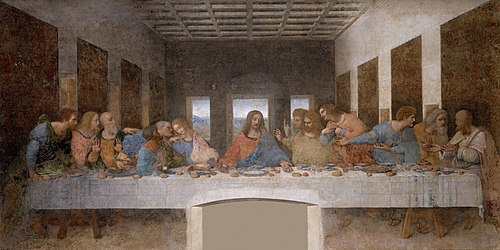
The above example links to many different pages, depending on where you click it. To find out more about the image, click on the double-rectangle icon

Syntax description[edit]
The contents of an <imagemap> tag consists of blank lines, comments (starting with #) and logical lines.
The first logical line specifies the image to be displayed.
This must be in the same format as an ordinary MediaWiki image link (see images help), except without the enclosing [[ and ]] markup.
If the first line specifies a "thumb" or "frame" image, then the first line's caption and any |alt= parameter are treated as the image's caption and alt text in the usual way; otherwise, the first line's |alt= parameter (or, if absent, any caption) specifies the image's alt text.
In neither case does the image itself have title text (often used for tooltips); any title text is taken from the regions described in later lines.
Further lines are split into tokens, separated by whitespace. The function of each line is determined by the first token in the line.
A coordinate consists of two tokens. The first token is the horizontal (X) position and the second token is the vertical (Y) position. All coordinates are according to the full-size image, not the visible image. The X and Y tokens should be specified as distance from left edge (horizontal pixel count) and distance from top (vertical pixel count) of the full-size image.
- desc
- Specifies the location of a blue "i" icon
 , which links to the image description. Possible values:
 top-right,bottom-right(default),bottom-left,top-left,none. This parameter is ignored for "thumb" or "frame" images, which instead employ the usual double-rectangle icon .
.
- poly
- A polygon. The coordinates of the vertices are given, followed by a link in square brackets.
- rect
- A rectangle. The parameters are the coordinates of the top-left and bottom-right corners, followed by a title to link to in square brackets.
- Example
<imagemap>
File:PolierMartinWombwellZoffany.jpg|thumb|200px|Colonel Antoine Polier
rect 269 140 344 305 [[Claude Martin]]
rect 124 147 181 298 [[Antoine Polier|Antoine-Louis Polier]]
desc none
</imagemap>
- circle
- A circle. The first two parameters are the coordinates of the center, the third is the radius. The coordinates are followed by a link in square brackets.
- default
- This gives the default link, where no other regions are specified.
All coordinates are specified relative to the source image. The image can be scaled using thumbnail syntax, in which case the image map coordinates will be automatically scaled as well.
All links are given in either the form [[Page title]] or [[Page title|description]]. In the latter case, the part after the pipe "|" becomes the title attribute of the link—in most browsers, it will pop up as a tooltip when the user hovers over it; the part after the pipe also becomes the alt text for the link. If no explicit link description is given, the page title is used.
Areas which overlap give precedence to the first link listed.
Installation[edit]
Make sure that uploads and ImageMagick are installed:
$wgEnableUploads = true;
$wgUseImageMagick = true;
$wgImageMagickConvertCommand = "/usr/bin/convert";
- Download and move the extracted
ImageMapfolder to yourextensions/directory.
Developers and code contributors should install the extension from Git instead, using:cd extensions/
git clone https://gerrit.wikimedia.org/r/mediawiki/extensions/ImageMap - Add the following code at the bottom of your LocalSettings.php file:
wfLoadExtension( 'ImageMap' );
 Done – Navigate to Special:Version on your wiki to verify that the extension is successfully installed.


- Troubleshooting
- Check to see if your php DOM is turned on. You may need to install it if it is not.
- Check whether ImageMagick is installed, since this extension relies on /usr/bin/convert for the resizing. If it is not present, you could get a page with only XML errors (tip: use the back-button in the browser, because you can still edit the page).
- On OVH mutualized hosting
$wgUseImageMagickshould be like:$wgUseImageMagick=false;
Composer[edit]
You can also install this extension using built-in Composer support.
composer require mediawiki/image-map @dev
composer update --no-dev" command.Usage with templates, magic words, or parser functions[edit]
If you want this extension (as with most tag extensions) to parse template parameters, magic words, or parser functions, you will need to use #tag syntax, such as w:Template:Click did.
In this case the vertical bar | must be replaced by a template {{!}}, where the source text of the template is | (except when they appear inside links or parameters).
- Example - standard form
<imagemap>
File:ExamplePlant80.png|60px|ExamplePlant
rect 0 107 294 260 [[Plants/ExamplePlant|ExamplePlant]]
desc none
</imagemap>
- Example - with variable
{{PAGENAME}}
{{#tag:imagemap|
File:ExamplePlant80.png{{!}}60px{{!}}ExamplePlant
rect 0 107 294 260 [[{{PAGENAME}}/ExamplePlant|ExamplePlant]]
desc none
}}
- Example – Modified to accept an input parameter to control image size
These modifications allow the template size to be adjusted on the edited (target) page and eliminate the need to create duplicate templates of various image sizes.
{{#tag:imagemap|
Image:Examplename.jpg {{!}}{{{1|640px}}}
rect 0 107 294 260
circle 360 114 70
poly 357 216 363 417 211
desc none
}}
Where {{{1|640px}}} is the input parameter “1” and a default image size of 640px.
Note: the input parameter requires a text string ending with “px” to function properly.
For example, calling a template {{TemplateName|400px}} will display the template at 400 pixels.
To convert the standard (existing) image maps to this optional format:
- Replace the initial
<imagemap>with{{#tag:imagemap| - Add
{{!}}{{{1|640px}}}after the image name (change the default image size to match the currently existing size).
- Note: By changing the default size (640px in this example) to the current image size, none of the existing template calls will have to be modified and will display correctly. Existing template calls can still be modified later by using the input parameter.
- Replace the final
</imagemap>with}}(the trailing braces).
See also[edit]
- Instructions
- A simple guide on how to use the Image Map editor with the ImageMap extension can be found at ImageMapEdit Howto on Meta-Wiki.
- A detailed guide for using the maschek image map editor can be found at this site.
- Wikimedia Commons also has a resource page on image maps: Commons:Image map resources
- Existing image maps examples: w:Category:Wikipedia image maps
- Wiki tools
- meta:User:Dapete/ImageMapEdit#English - ImageMapEdit script, a graphical tool to determine the coordinates that can be installed on any wiki.
- Online tools
- http://www.maschek.hu/imagemap/imgmap Online image map editor, supports all shapes, Extension:ImageMap compatible.
- http://www.image-maps.com/index.php? Basic on-line image mapper.
- http://summerstyle.github.io/summer/ - Open-source interactive online image mapper
- Similar functionalities
- Extension:DrawioEditor - working with diagrams and drawings
 | This extension is being used on one or more Wikimedia projects. This probably means that the extension is stable and works well enough to be used by such high-traffic websites. Look for this extension's name in Wikimedia's CommonSettings.php and InitialiseSettings.php configuration files to see where it's installed. A full list of the extensions installed on a particular wiki can be seen on the wiki's Special:Version page. |
 | This extension is included in the following wiki farms/hosts and/or packages: This is not an authoritative list. Some wiki farms/hosts and/or packages may contain this extension even if they are not listed here. Always check with your wiki farms/hosts or bundle to confirm. |
- Extensions bundled with MediaWiki 1.21
- Stable extensions
- Tag extensions
- Extensions supporting Composer
- GPL licensed extensions
- Extensions in Wikimedia version control
- ParserFirstCallInit extensions
- All extensions
- Extensions used on Wikimedia
- Extensions included in BlueSpice
- Extensions included in Canasta
- Extensions available as Debian packages
- Extensions included in Fandom
- Extensions included in Miraheze
- Extensions included in MyWikis
- Extensions included in ProWiki
- Extensions included in semantic::core
- Extensions included in ShoutWiki
- Extensions included in Telepedia
- Extensions included in wiki.gg
- Extensions included in WikiForge
- Link extensions
- Image map extensions